Add-on · ₱400/mo per hotel
Your restaurant, in the same system as your rooms
Orders, kitchen, menu, tables and recipes — and every dish sold takes its ingredients out of stock.
A hotel restaurant is usually run as a second business on paper. Its own tally sheet, its own stock counted when someone remembers, and guest meals written on a slip that reaches the front desk before check-out — or does not.
Two things go wrong, both quietly. Stock leaks, because nobody can tell the difference between what should have been used and what is gone. And the property's profit figure is wrong, because half its revenue and most of its waste are outside the system.
Restaurant is a paid add-on at ₱400 a month per hotel, on top of your core plan. Everything needed to run the rooms themselves is already included — see the platform.
How it works
Orders that stay open
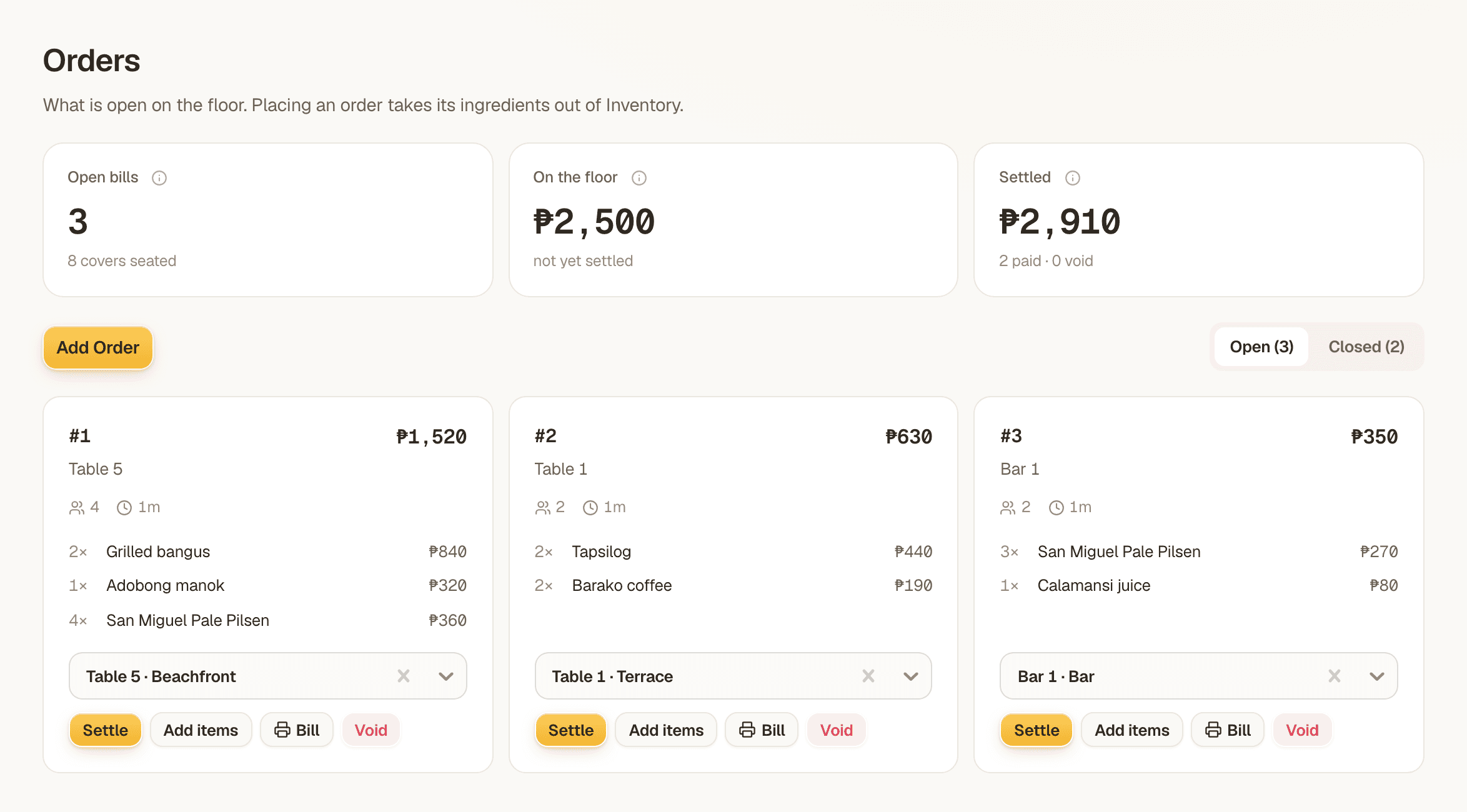
A bill belongs to a table and stays open while people keep ordering. Add a round, move the party to a different table, print the bill, settle it — or void it with a reason.
Each order carries its cover count and how long the table has been sitting, so the floor is readable at a glance: what is open, what is still to settle, and what has already been paid or voided.
The kitchen sees it, and clears it
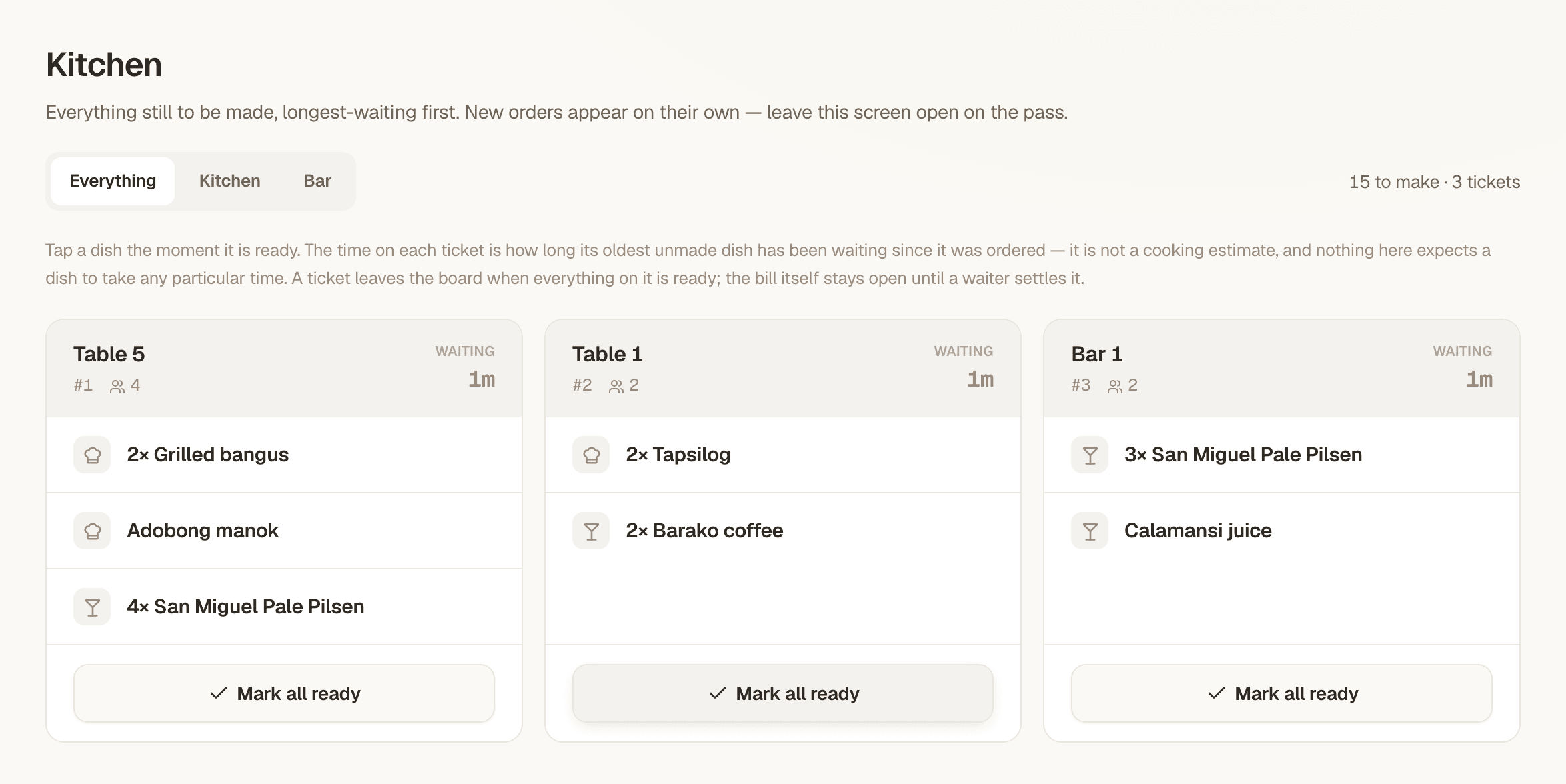
Menu items are routed by prep area — kitchen or bar — and carry an expected prep time. The kitchen screen shows the queue, and items move through their prep states individually so a plate that is ready is not held by one that is not.
Tickets get bumped when they are done. The screen is meant to hang on a wall for the whole service, which is why the restaurant module has per-screen access: a cook can be given the kitchen queue and nothing else — not the menu prices, not the recipe book, not the till.
Recipes that draw down stock
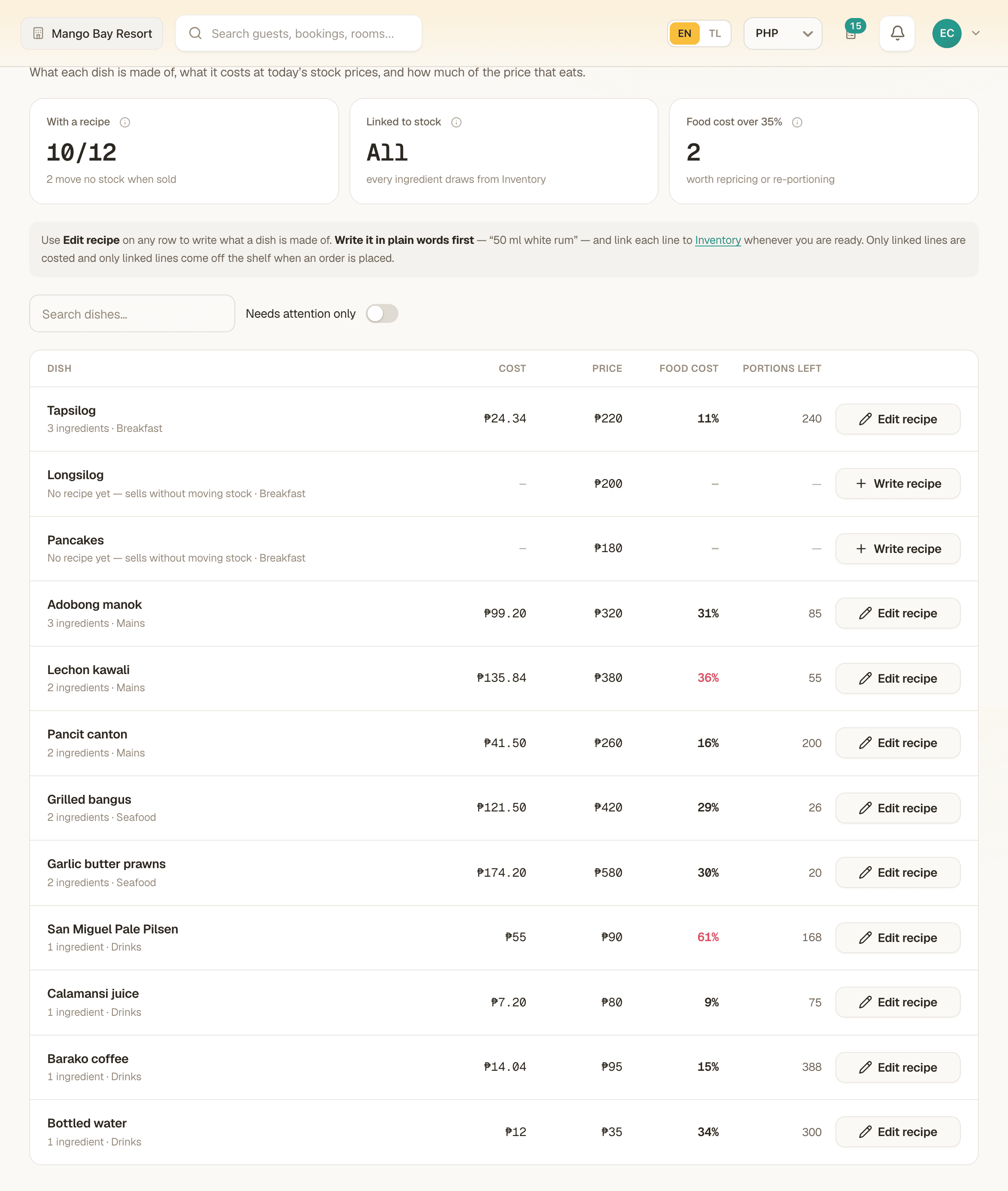
Each menu item is linked to its ingredients, with a quantity and a unit. Place an order and the ingredients come out of inventory automatically — no clipboard, no end-of-week guess about how much rice you actually went through.
Void a bill and the stock comes back. Deliberately, it is returned from the movements that order actually wrote, not by re-calculating the recipe: a recipe edited since the order was placed would otherwise return the wrong quantities, and an ingredient since removed from it would never come back at all. The ledger is append-only, so a void is a compensating entry rather than a deletion.
Sizes, extras and swaps that move stock correctly
A size, an extra, or a swap is not a note the kitchen has to be told out loud — it is a modifier group on the menu item, priced with its own delta, and a variant (small or large, half or full) is a required single-select so there is never a second, conflicting way to record it.
The choice a guest actually made is snapshotted onto the order line the same way the dish name and price already are, so repricing the menu later never rewrites a bill that already printed. And because a modifier can adjust what the recipe draws from inventory, 'large fries' and 'regular fries' correctly take different quantities out of the store instead of both being counted as the same dish.
Charge it to the room
This is the thing a standalone POS structurally cannot do. A bill can be attached to a stay, and then settled to the room — it lands on the guest's booking and clears at check-out with the rest of what they owe.
The guard is the useful part: a bill that is not attached to a stay is refused for room settlement rather than silently posted somewhere. Cash, card and e-wallet are the other tenders.
Senior citizen and PWD discounts, computed properly
A Philippine restaurant cannot operate without this, and it is the part most software gets wrong. MangoHost takes the claim — senior or PWD, the cardholder's name, their ID number, and how many of the diners are eligible — validates it against the cover count, and computes the rest itself.
The amount is not the cashier's to type. It is worked out server-side as the statutory share of the bill, with the eligible diners' portion made VAT-exempt and the remainder left vatable. Accepting a typed figure would let a keying error become a tax position.
On the house, kept apart from a discount
A free drink for a VIP and the owner sitting down to eat are both real, and neither one is a discount. A line can be marked on the house with one tap while it is being rung up; the whole bill can be comped at the till, which closes it at zero with no payment method recorded, because a free bill was never tendered.
Comps are reported apart from discounts everywhere they are stored — a discount reduces a sale the BIR expects declared, a comp is a sale that never happened, and folding the two together would overstate both and quietly bury a manager's free round inside a statutory senior/PWD total. What does land is the cost: the ingredients still left the store, so a comped plate shows up as the expense it actually was, with no revenue against it.
The till: an X-reading while it runs, a Z-reading that locks
A cashier opens a shift by counting a float into the drawer, and a bill cannot settle without an open shift — that refusal is what makes the reading mean something. While the shift is open, an X-reading is a non-destructive snapshot, readable as many times as a supervisor likes: bills, covers, net sales, so far.
Closing the shift is a Z-reading, and the control is the blind count — the cashier writes down what is actually in the drawer before the system reveals what should be there, not after. It is then locked, numbered next in the hotel's sequence, and never changes again: cash, card, e-wallet and room charges each broken out (only cash counts toward the drawer), gross and net sales, both kinds of discount kept apart, VAT, voids by count and value, and the variance between what was declared and what was expected.
A month of service, on one screen
Order history turns a season of bills into the numbers a manager actually asks for: orders settled, open and void, net sales and average bill, cost of sales, gross profit and margin, and what was given away as comps — for any period, broken into Monday-to-Sunday weeks that add up to the month rather than being padded out of the neighbouring ones.
Every bill is listed with how it settled, so a specific number on the summary is never more than one click from the bills that produced it.
The tax arithmetic, done correctly
Your registered business name, address and TIN print on the bill from your business profile. VAT is decomposed out of the menu price the way Philippine receipts do it, not added on top — and if you are not VAT-registered, the bill says so instead of inventing a VAT line.
The tax status and rate are snapshotted onto the sale at settlement. If you change registration later, closed sales keep reporting what they actually reported.
What we do not claim: this is not a BIR-registered invoice
MangoHost has not been accredited by the BIR as a point-of-sale or computerised accounting system. By default, every printed document says so plainly — "This is not a BIR-registered invoice" — rather than staying quiet about it, because a printed bill that looks official and is not is worse than one that admits what it is.
If your property has separately obtained its own BIR Permit to Use for this system, you can enter that permit number and your machine serial on your business profile, and the document prints as a Sales Invoice with both on it. That accreditation is yours to obtain — from the BIR, for your own property — not something MangoHost applies for on your behalf or claims to already hold. If you need that step, talk to your accountant about what it involves before assuming the software has taken care of it.
Before you buy
What it does not do
It is a hotel F&B system rather than a full standalone POS, and it is not a BIR-accredited one. If any of this is a deal-breaker, we would rather you knew before the demo than during it.
- Splitting one bill across several payments or several people
- BIR accreditation — MangoHost has not been accredited as a point-of-sale system; documents print as courtesy bills unless your property holds its own Permit to Use
In detail
| Open bills by table | Add rounds, move tables, print, settle or void with a reason. |
|---|---|
| Covers and time on table | Per order, on the floor view. |
| Floor KPIs | Open bills, value on the floor not yet settled, settled split by paid and void. |
| Tables and zones | Create, rename, reorder, retire and restore; seats and zone per table. |
| Menu | Categories and items with price, description, sort order and an availability toggle. |
| Prep routing | Each item routed to kitchen or bar, with an expected prep time. |
| Kitchen queue | Per-item prep state and ticket bumping. |
| Recipe book | Menu item to inventory item, with quantity and unit. |
| Automatic stock depletion | Placing an order consumes its ingredients. |
| Void returns stock | Reversed from the movements written, as an append-only compensating entry. |
| Menu modifiers | Sizes, extras and swaps — required single-select for variants, priced with a delta, snapshotted onto the line, adjusts recipe stock draw. |
| Charge to room | Settle a bill onto an attached stay; refused when there is no stay. |
| Tenders | Cash, card, room, e-wallet. |
| Manual discount | An amount off, recorded as a manual discount. |
| Senior / PWD discount | Validated claim, server-computed statutory amount, per-diner proration. |
| Comps | A line or a whole bill on the house — kept apart from discounts, cost still lands as an expense. |
| Cashier sessions | Opening float; a bill cannot settle without an open shift. |
| X-reading | Non-destructive running total, readable anytime the shift is open. |
| Z-reading | Blind cash count, then a locked, numbered close — variance, tenders, discounts, VAT and voids. |
| Order history | Monthly KPIs — net sales, average bill, cost of sales, gross profit, margin, comps — by week, with every bill listed. |
| VAT breakdown | Vatable, VAT-exempt and VAT amount, decomposed from the price; non-VAT registration handled. |
| Business profile on bills | Registered name, address, TIN and receipt footer print on every bill. |
| BIR Permit to Use | Not held by MangoHost. Enter your own PTU and machine serial if you hold one; otherwise the document states plainly that it is not a BIR-registered invoice. |
| Settlement snapshot | Tax status and figures frozen on the sale so later config changes cannot rewrite it. |
| Per-screen staff access | Grant Orders, Kitchen, Menu, Recipe book or Tables individually. |
| F&B in the profit figure | Restaurant revenue joins the same monthly calculation as the rooms. |
Who this is for
You have a restaurant inside your hotel
Charge-to-room and one shared profit figure are the two things a standalone POS cannot give you, no matter how good it is at taking orders.
You suspect your kitchen costs more than it should
Recipe-linked depletion turns that suspicion into a number, because what should have been used and what actually left the store are finally two comparable figures.
Related
See it on your own property
We will set it up with your menu, or your guide, on the call. No card, nothing to sign.