Run the day
See every room, every night, at a glance
Take a booking in seconds, and know it cannot collide with one you already have.
A booking arrives on Messenger while the front desk is checking someone in. It gets written down later, or it does not. The next enquiry for the same dates gets a yes. Nobody finds out until two guests arrive for one room, bags down, with a queue behind them.
The other version is quieter and more expensive: a walk-in asks for a room and nobody can price it, because the rate for August is in a notebook that is not on the desk. They leave.
Bookings & calendar is one of the modules included in the MangoHost platform — every plan has all of them, so nothing on this page is an upsell.
The workflow
How it works
Take a booking in seconds
Room, dates, source, guest. Availability is checked as you type, against everything already in the system — so the collision is refused at entry rather than discovered at check-in.
Every booking carries where it came from: direct, walk-in, returning guest, corporate, or an agent. That is what makes the channel breakdown in your analytics real rather than a guess.
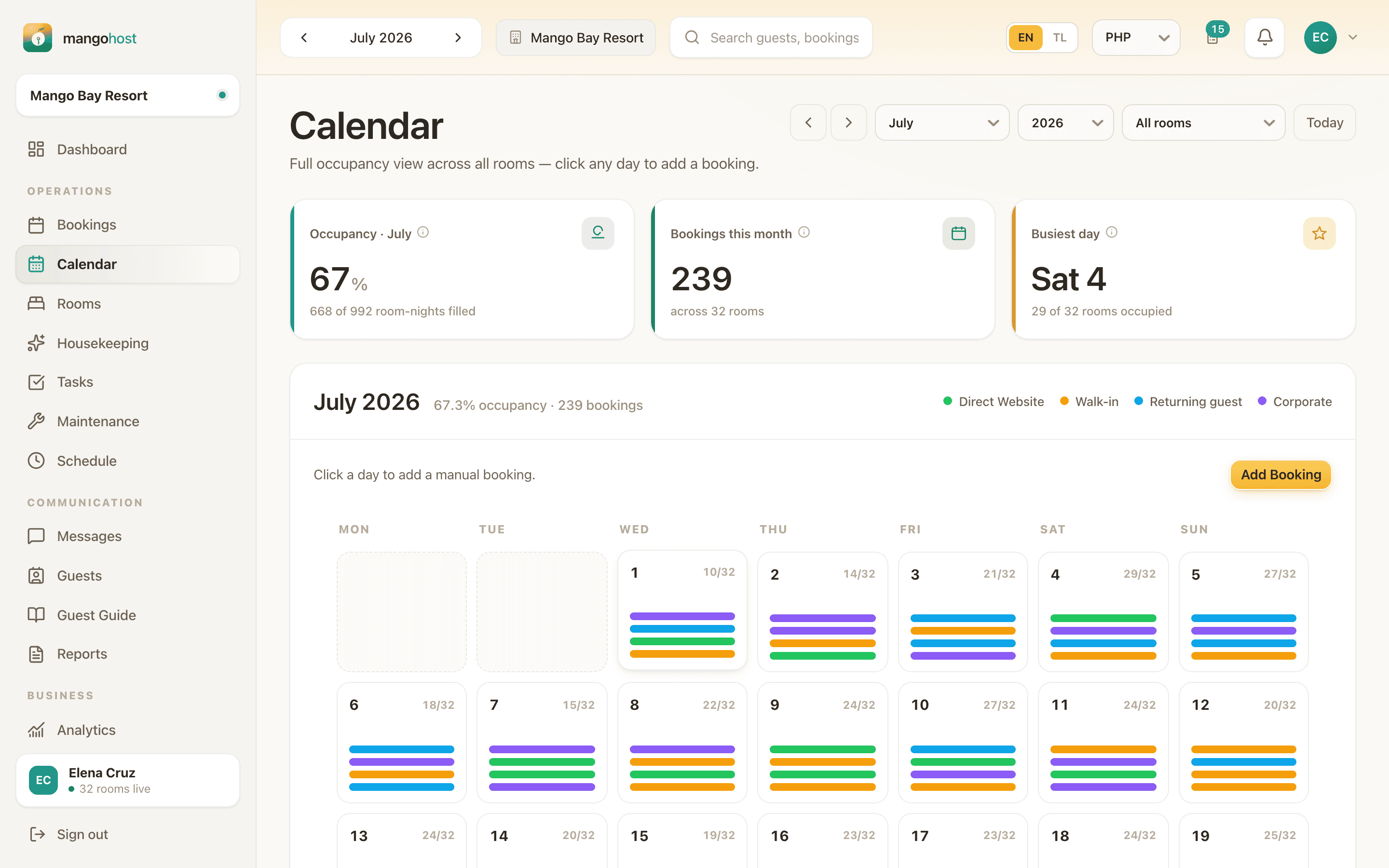
One grid, every channel
The calendar shows all your rooms down one side and the nights across the top, colour-coded by source. Gaps are visible as gaps — the two-night hole between a Friday departure and a Monday arrival is something you can see and sell.
Drag a booking to move it, or to assign it to a different room. No form, no re-entry.
Assign the actual room, not just the type
Most small-hotel tools stop at the room type: two Sea View doubles, one sold. MangoHost keeps the individual rooms underneath the type, so you can put a guest in 204 specifically — the quiet one, or the one with the working aircon.
A booking can also sit unassigned on purpose. Take the reservation now, decide the room on the morning of arrival.
A booking has a life, not a status
Confirm the dates. Confirm the payment. Check the guest in. Complete the stay. Or decline it, cancel it, mark it a no-show, or dispute a refund. Each of those is a real state with a recorded event behind it, so the history of a booking is answerable weeks later.
That matters most for the awkward ones. A no-show is not a note in a cell — it is a state, on a booking, with a date and a person attached.
Check-in isn't a one-way door either. Tap the wrong row at a busy front desk and it can be undone — back to confirmed, the room returned to clean — recorded in the booking's history with the reason, and only reversible from checked-in, so a completed stay can never be un-checked-in by mistake.
Click a booking, see everything about it
A row on Bookings, a bar on the calendar, or one on the dashboard's calendar all open the same panel: dates and nights, the guest and how to reach them, the room type and the specific room assigned, source and channel reference, every figure — total, per night, discount, downpayment, balance, cancellation policy — any extras, the notes, and when and how it was booked.
A party holding several rooms says so on the panel and lists the others, because each room is its own booking row sharing one party — describing only the row you clicked would describe a third of the stay.
A downpayment now, the balance at checkout
Hotels don't get paid the way a nightly rate implies — a downpayment when the booking is made, the rest at checkout. Taking a booking asks what was actually collected: nothing yet, a downpayment with an amount, or paid in full, and the balance owed is what's left. Income is recognised from confirmed payments as they're actually collected, dated by when they were confirmed, not spread evenly across the nights — which is what a decision made from the numbers actually needs.
In detail
| Manual booking entry | Create, edit and delete reservations. |
|---|---|
| Live availability check | The same engine the calendar draws from, unit-tested. |
| Unit-level assignment | Assign a specific room, not only a room type. |
| Unassigned bookings | Take the reservation before choosing the room. |
| Day-use bookings | A first-class booking type, not a workaround. |
| Multi-room party bookings | One guest, several rooms of the same type — grouped, with only genuinely available rooms offered. |
| Full host lifecycle | Confirm dates, confirm payment, decline, check in, complete, cancel, no-show, dispute a refund. |
| Undo check-in | Reverses to confirmed and returns the room to clean; only from checked-in, recorded in the booking's history. |
| Booking detail panel | Dates, guest contact, room, source, full money breakdown, cancellation policy, notes and party — from one click. |
| Downpayment & balance | Not paid, a downpayment, or paid in full — income recognised as payments are actually confirmed. |
| Status event trail | Every transition recorded with its date. |
| Booking KPIs | Revenue booked, confirmed, pending review, room-nights, average nights per stay. |
| Filter matrix | By status, room, source and month, with pagination. |
| Inbound booking requests | Approve or reject requests from connected platforms, with a header badge. |
Who this is for
You are taking bookings in more than one place
Messenger, phone, walk-ins and an agent or two. The value here is not the calendar — it is that everything lands in one place before it can conflict.
You have more than one room of the same type
Type-level availability starts lying the moment you have two of something. Unit-level assignment is the fix.
See it on your own property
Thirty minutes with the IslandLink team, your rooms and your rates. No card, nothing to sign.